The crisis
A mid-life crisis is a psychological transition of identity and self-doubt that typically affects adults between the ages of 40 and 65.
In a light-hearted look at how it affects men, there is no shortage of stories. Some buy the toy they always wanted, like a sports car. Others go for something more reckless, like an extra-marital affair.
Being a male living a relatively dull life, I experienced one too. No new vehicle. No affair. The result of my mid-life crisis was a change in favorite colors, from baseball’s Chicago Cubbie blue to bright orange. Don’t think construction orange. Think closer to pumpkin orange.
Exciting, isn’t it?
Orange is energetic, exciting, friendly, and playful. It was the change I needed in my life. (Really?)
The professional problem
As a digital accessibility professional, I have to admit that orange has one negative trait: it is mostly inaccessible. Not on its own, of course, but the moment you try to pair it with another color.
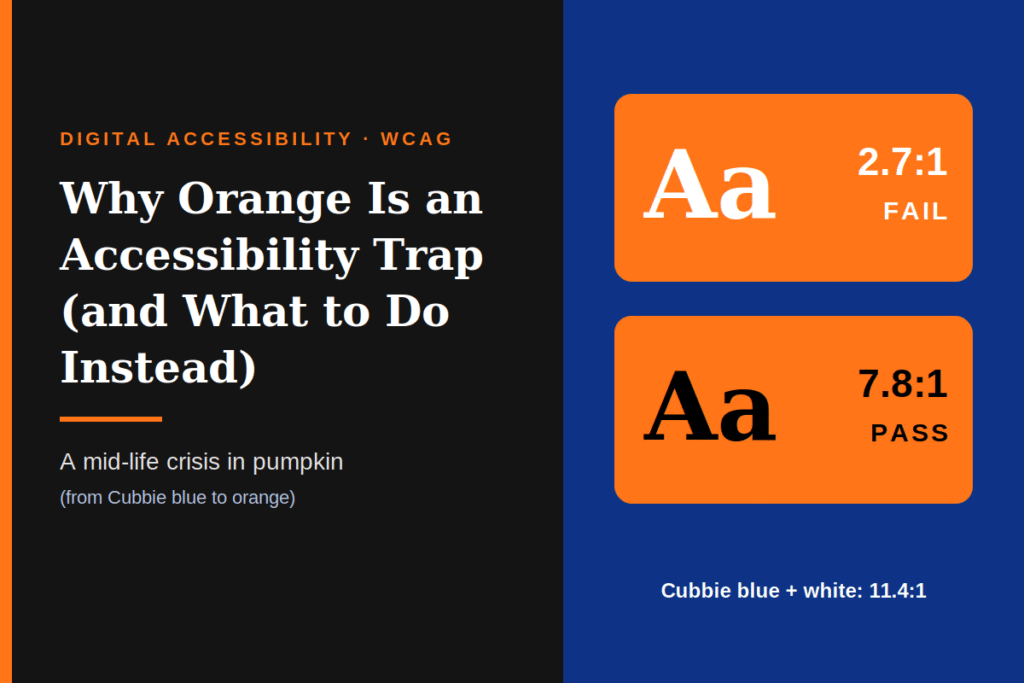
My old favorite, Chicago Cubbie blue A, is dark enough to carry white text at better than 10:1. Pumpkin orange A (around #FF7518) gets only about 2.7:1 against white. The Web Content Accessibility Guidelines (WCAG) SC 1.4.3 requires 4.5:1 for normal text and 3:1 for large text and meaningful UI components, so white on pumpkin orange fails every one of those tests.
The most dependable partner for orange is black, or something very close to it. Black on pumpkin orange reaches roughly 7.8:1, which clears AA with room to spare and nearly reaches AAA. That pairing works, but it also means everything starts to look like Halloween.
The math behind the problem
WCAG 2.x measures contrast as a ratio of relative luminance between two colors. Orange sits in the awkward middle of the luminance range. It’s too bright for white to contrast well against it, and too saturated to feel natural with mid-gray.
| Pairing | Contrast | Result |
|---|---|---|
White text on #FF7518 A (pumpkin) | ~2.7:1 | Fails AA |
White text on #FF6600 A | ~2.9:1 | Fails AA |
White text on #FFA500 A | ~2.0:1 | Fails badly |
Black text on #FF7518 A | ~7.8:1 | Passes AA, near AAA |
Black text on #FFA500 A | ~10.6:1 | Passes AAA |
White text on #C2410C A (burnt orange) | ~5.2:1 | Passes AA |
Orange doesn’t fail everywhere. It fails in the pairings designers reach for most: white text on an orange button, or an orange link on a white page.
Why designers keep falling into it
- Brand colors come first. Many palettes were chosen for print or logos, where contrast against body text was never tested.
- Orange looks fine on a good monitor. Failures hide at full brightness in a controlled office. They show up in sunlight, on dim screens, and for users with low vision or aging eyes.
- Orange is used for calls to action. The element you most want people to read often has the weakest contrast.
- It fails more than text. An orange focus ring, form border, or icon on white fails the 3:1 non-text contrast requirement (WCAG 1.4.11).
Orange and color vision deficiency
For people with red-green color blindness, orange can be hard to tell apart from red, yellow, or green. An orange “warning” beside a green “success” and a red “error” may look nearly identical. WCAG 1.4.1 says color can’t be the only way information is conveyed, so orange status indicators need an icon, label, or pattern.
“Few colors pass” – the accurate version
It’s tempting to say that few colors pass WCAG. The more precise statement is that contrast depends on the pair, not the color alone. Mid-luminance colors such as orange , amber, coral, lime, and turquoise can’t pass with both black and white. They pass with dark text and fail with white text.
- Colors that work with white text must be dark: navy, forest green, burgundy, charcoal, deep purple. (Cubbie blue is one of them.)
- Colors that work with black text can be light: yellows, pale oranges, mint, sky blue.
- Mid-tone brights are the hard zone, where you must deliberately choose a side.
Practical fixes
- Darken the orange. Burnt orange or rust (around
#C2410Cor darker) can carry white text and sit on light backgrounds. You keep the warmth and lose the glare. - Flip the text color. Keep the bright pumpkin and use black or near-black text on it.
- Use orange decoratively, not functionally. Illustrations, large backgrounds, and accents can stay bright. Text, borders, icons, and focus indicators need the accessible version.
- Add a second signal. Icons, underlines, and labels preserve meaning when hue can’t.
- Publish tested token pairs. In a design system, document “orange-600 on white” and “orange-500 with dark text” so teams don’t improvise.
- Test in both themes. Use the Colour Contrast Analyser (CCA) or browser dev tools, and check dark mode too.
The takeaway
My mid-life crisis gave me a favorite color that is energetic, friendly, and playful, and a daily reminder of why contrast checking matters. Orange isn’t forbidden. It’s demanding. Choose the pair first and the brand color second, and you can have the vibrancy without locking anyone out.
Happy Halloween, year-round.