
You know … there’s times when technology can make you feel real stupid.
I heavily use WordPress as my blogging platform. I also use it as a CMS to design, develop and build out sites for clients. I’ve used WordPress for several decades. Which means I used WordPress when there only was the Classic Editor.
And then came Gutenberg.
I was a hold out in using Gutenberg, primarily to wait until the dust settled, the bugs were addressed, and it became more accessible.
This past year, I resurrected my professional blog, and promoting posts via social media. I use Buffer to schedule posts once a week, in advance, as I am too busy to manually post to LinkedIn and Bluesky during the week.
Problem
Back in the day (can you tell what generation I am a part of?), as soon as I entered a post title and it saved, a permalink for the post once published appeared in the Classic editor.

However, now that I am using the default Gutenberg editor, the only time I receive the permalink is once I publish the post.

“But I don’t want the permalink after publishing … I want it before!”
Over a period of months, I performed various searches for a solution, some guidance explaining where this feature was in Gutenberg. There was no answer, besides the typical “get this plugin,” the primary pain point for me with the WordPress ecosystem; too much reliance on plugins.
This morning, after giving in and installing a plugin that advertised to address the issue (and didn’t), I stumbled across the solution, just a single click away, from within Gutenberg.
Solution
From the post’s Settings sidebar, activate the Slug.
Yes, that simple.
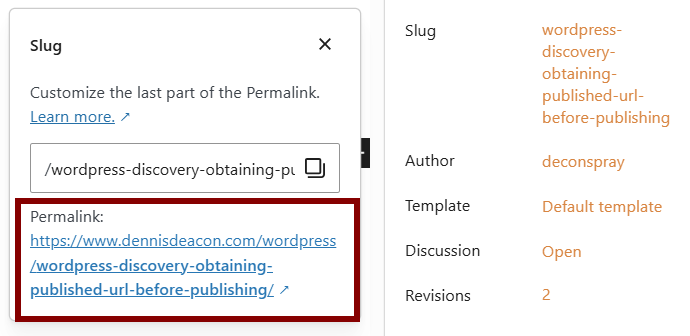
Ain’t that a kick in the head?