Summary
This is an article in a series of articles on digital accessibility posted on Global Accessibility Awareness Day (GAAD) 2026. Want to celebrate and participate? Share this article with others in your digital world.
PDF remains one of the most widely used document formats across business, education, healthcare, and government. Yet it also ranks among the most persistent sources of accessibility barriers. Organizations that rely heavily on PDF distribution often underestimate the complexity involved in making those documents truly accessible, and users with disabilities pay the price.
Why PDFs Become Inaccessible
Accessibility failures in PDFs rarely stem from carelessness alone. They stem from a lack of awareness about what assistive technologies actually need to interpret a document correctly. A visually polished, beautifully designed PDF can be completely unusable for someone relying on a screen reader.
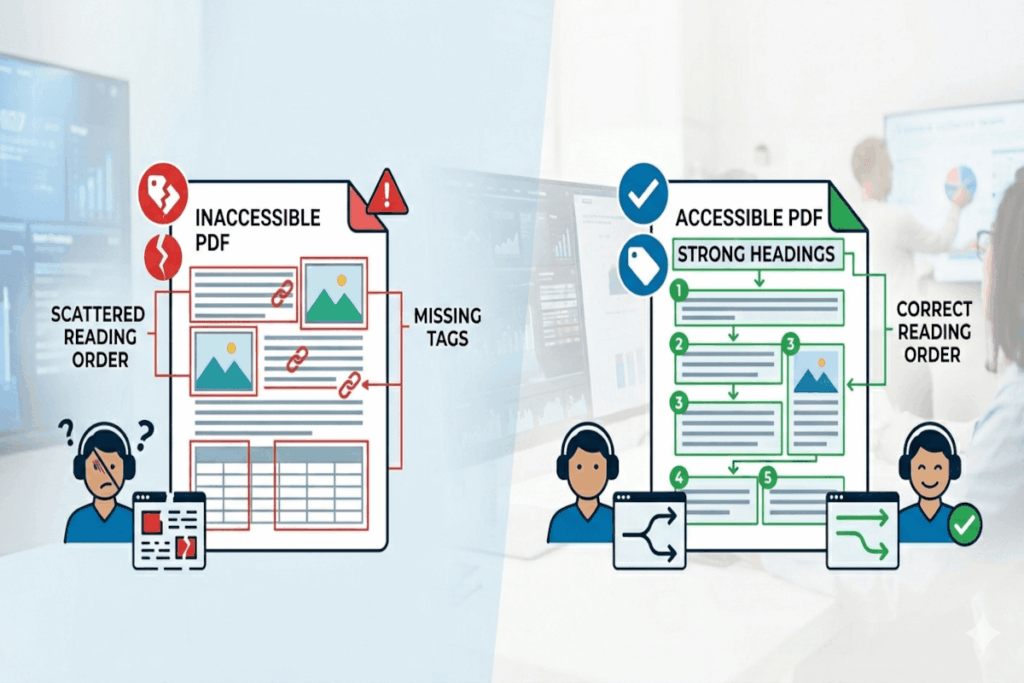
The most common culprits include missing document tags, incorrect reading order, untagged tables, absent headings, vague link text, images without alternative text, form fields without labels, and scanned image-only documents. Each of these issues creates a real barrier for real people. Taken together, they render an otherwise professional document inaccessible to a significant portion of your audience.
Source Files Are Where Accessibility Begins
One of the most powerful shifts organizations can make is recognizing that accessibility starts long before a document becomes a PDF. The authoring stage is where you have the greatest leverage.
When content creators build well-structured source documents in tools like Microsoft Word or PowerPoint, with proper heading hierarchies, named styles, and logical content flow, the exported PDF inherits much of that structure automatically. Skipping this step forces teams to remediate accessibility after the fact, which costs more time, more money, and introduces more risk of error.
Accessibility built upstream is always cheaper and more reliable than accessibility patched downstream.
Reading Order Is Not Optional
Screen reader users experience a document sequentially. They move through content the way a reader would move through an audiobook: one element at a time, in order. When the reading order is wrong, the document does not just become harder to use. It becomes incomprehensible.
This problem is especially acute in multi-column layouts, sidebars, pull quotes, and heavily designed annual reports or marketing materials. Visual design tools arrange elements spatially. Assistive technologies read them structurally. When those two things conflict, users lose the thread entirely.
Tables and Forms Demand Structural Rigor
Tables and forms are two of the most technically demanding elements in any PDF. Tables require proper header cells, logical row and column structure, and clear relationships between data points. Forms need labeled interactive fields, logical tab order, and instructions that users can actually access before they begin filling out the form.
These elements fail more often than almost any other component in complex PDFs. Getting them right requires intentional structure from the very beginning of document creation, not a quick fix at the end.
Sometimes HTML Is the Right Answer
Not every piece of content belongs in a PDF. Frequently updated content, transactional workflows, and mobile-first experiences often serve users far better as accessible web pages. HTML, when properly coded, offers native accessibility support that PDFs have to work hard to replicate.
The measure of the right format is not tradition or habit. It is whether your users can actually access and use the content effectively. That standard should drive every publishing decision your organization makes.
PDFs Are Here to Stay, So Your Workflows Need to Evolve
PDF is not disappearing from enterprise or government publishing workflows anytime soon. That reality demands a structural response. Occasional remediation projects are not a strategy. They are a symptom of a workflow that treats accessibility as an afterthought.
Organizations that lead on accessibility build it into their content creation process from day one. They train authors, adopt accessible templates, establish quality checkpoints, and treat document accessibility as an operational standard rather than a compliance checkbox.
Review your document publishing process today. Shift accessibility upstream, into content creation, and stop relying on post-production repair to carry the weight of a problem that should never reach production in the first place.